WB PILOT 3 Animated Watch Face
WatchBase AuraPersonalization
4.226.00 Reviews
- Version
- Varies With Device
- Installs
- 10.00K
- Age Rating
- Everyone
Screenshots
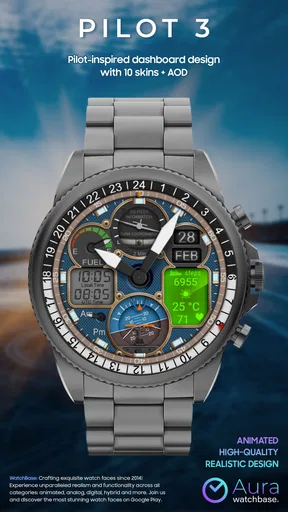
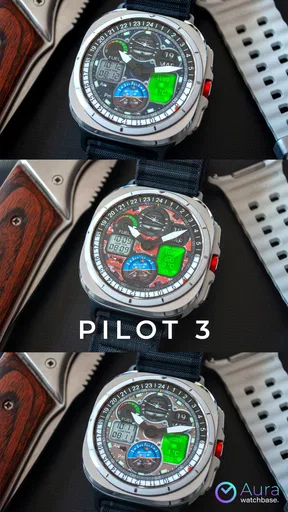
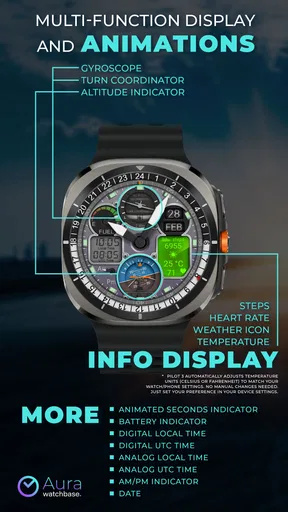
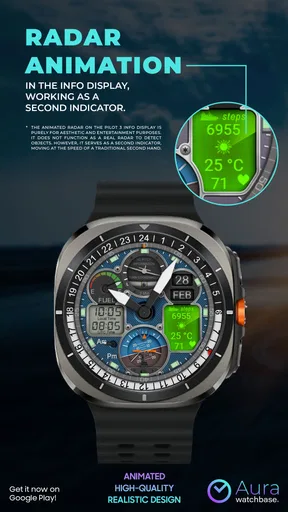
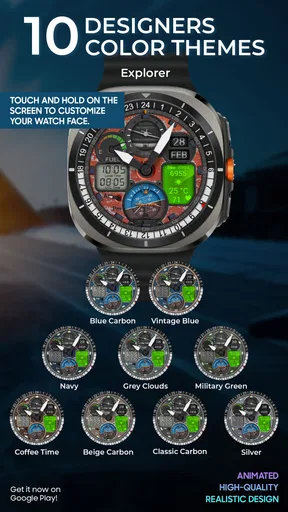
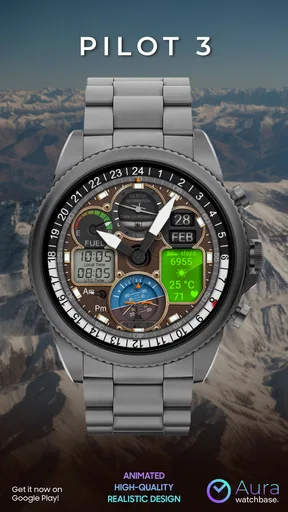
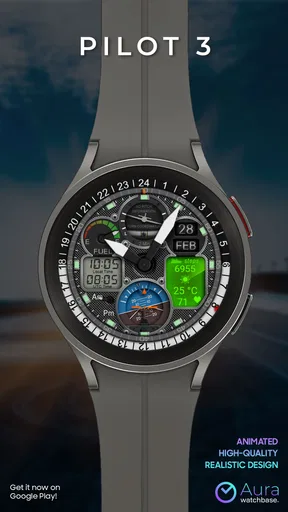
Our Review of WB PILOT 3 Animated Watch Face
 Analysis by Appyee
When I consider a watch face, I care about more than whether it looks impressive in a screenshot. I want to read it quickly, use it comfortably in the situations I actually wear a watch, and understand what I’m trading away for a more elaborate design. That is the lens I’d use for WB PILOT 3 Animated Watch Face: its aviation-inspired style has personality, but the practical question is whether that personality fits your everyday habits.
Reading the aviation-inspired display
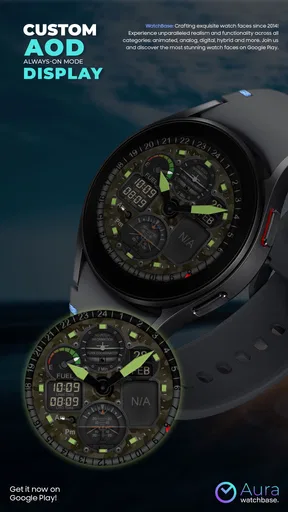
The airplane-dashboard look gives this watch face a distinctive visual identity, and the choice of ten skins offers a way to change its appearance rather than settle for one fixed presentation. I’d treat that choice as a practical decision as much as a style choice: a design that looks striking in a still image may not be the one I can read most easily during a quick glance. Before settling on a skin, I’d compare them on the watch itself in the lighting and at the viewing angle I encounter most often.
That small check matters because a wrist glance is not the same as looking at a phone. You may be walking, carrying something, or checking the time while talking to someone. A layout that feels clear when you deliberately study it can be harder to scan when you only have a moment. If fast access to the time is your priority, choose the skin that makes the main information easiest for you to pick out, rather than the one with the most dramatic dashboard effect.
The custom always-on display option is relevant for people who prefer to see a persistent watch face without raising their wrist to wake the screen. It can make checking the time feel more immediate, especially at a desk or during a conversation. At the same time, an always-visible presentation is not automatically easier for every person or every setting: some users prefer a simpler, less visually busy resting view, while others may want to conserve their watch’s power. I would try the available AOD presentation in ordinary use and decide whether its convenience is worth keeping it enabled.
Controls, comfort, and sensory preferences
A watch face is mostly something you look at, so it makes fewer demands on precise touch than an app built around small buttons. That can be a real advantage for someone who wants to personalize a watch without navigating a complicated interface every day. Still, setup can involve making choices on a small screen, and people who find tiny controls difficult may prefer to do that patiently rather than while rushing out the door.
The animated styling is part of the appeal, but movement is a matter of preference. Some people enjoy a display that feels alive; others find visual motion distracting, particularly when they are trying to check one piece of information quickly. If you are sensitive to animation, or simply want the calmest possible screen, consider whether this aviation theme suits you before paying for it. A more restrained, static watch face may be a better fit if your main goal is an uncluttered glance.
It is also worth separating visual character from functional clarity. A cockpit-inspired arrangement can feel familiar to aviation fans, but it may be less immediately intuitive to someone who prefers a plain digital face. I would not choose a skin just because its instruments look authentic; I’d choose it only if I can reliably find the information I personally care about without having to interpret decorative details.
Where it fits into a day
Imagine checking your watch while carrying groceries or waiting for a bus. You want to know the time quickly, not pause to inspect the design. A useful way to judge this face is to wear it through those ordinary moments, not only when you are sitting still and admiring the screen. Try a quick glance indoors, outside, and while your attention is divided. If the selected skin remains easy for you to scan, its distinctive look is serving a purpose rather than getting in the way.
The AOD option can also suit a workday when you want the time visible beside a keyboard or during a meeting. For a quieter setting, a more understated skin may draw less attention than a bold dashboard look. On a walk or during another activity where you only check your wrist briefly, the best choice may be the face that gives you the clearest immediate read, even if it is not the most elaborate option.
These are personal-use trade-offs, not guarantees about how every watch will behave. Screen size, display characteristics, and individual eyesight can change what feels readable. I would use the watch you plan to wear as the final test rather than judging the design on another device or from a promotional image.
Choosing it over a simpler watch face
In the personalization category, the usual alternative is a built-in digital or analog face that favors a familiar layout and minimal fuss. Those options can be a better choice if you want the plainest possible time display, are easily distracted by motion, or do not care about an aviation theme. This app makes more sense if you specifically want a pilot-inspired appearance and value having several skins and a custom AOD presentation to make that look your own.
That distinction helps answer whether the paid download is worthwhile. A theme alone may not justify the price for someone who changes faces rarely or is already happy with a standard one. For a person who enjoys tailoring a watch’s appearance and will actually compare the skins, the appeal is more concrete. I’d decide based on whether the design and its customization are things I’ll notice and use every day, rather than assuming that extra visual detail automatically means better function.
Before buying, I’d also make sure the watch and phone combination I intend to use is supported by the app’s current installation route. A watch face is only useful if it can be applied on the device you own, and broad claims about smartwatch compatibility are not a substitute for checking the relevant store and watch setup. That is especially important if you are buying specifically for one model or using a less common watch configuration.
Practical checks before settling on a skin
There are a few simple ways to make the choice more deliberate. First, decide what you want to recognize at a glance: the time, a particular display element, or the overall design. Then try the available skins with that priority in mind instead of cycling through them only for their colors. A skin that looks balanced in a close-up may not be the easiest one to interpret at arm’s length.
Second, compare the regular presentation with the custom AOD option in the places where you expect to use the watch. If a persistent display helps you check the time without a wrist gesture, it may earn its place; if you find the resting screen too noticeable, you may prefer a different setup. Third, give yourself time to adjust rather than deciding after one glance. Familiarity can make a specialized layout easier to read, but there is no reason to force yourself to keep a style that still feels busy after normal use.
These checks are useful for anyone, and especially for people with changing visual needs or environments. A face that works well in a bright room may not feel as comfortable in a dim one, and a design that suits a relaxed weekend may be distracting during focused work. I’d treat skin selection as a small piece of personalization that can respond to context, not a one-time choice that must suit every situation perfectly.
First Impressions
From the moment I installed the WB PILOT 3 Animated Watch Face, it was clear that this wasn’t your average watch face. It’s designed to give your smartwatch a dynamic, pilot-inspired look that’s both sleek and functional. The animated elements add a layer of sophistication, making it more than just a pretty face.
Design and Aesthetics
The design is where this app really shines. It combines classic aviation-style dials with a modern digital twist. You get the best of both worlds—traditional watch lovers will appreciate the analog look, while tech enthusiasts will love the digital features. The animations are smooth, and the transitions are seamless, which adds a sense of liveliness without being over the top. And if you're into customization, you’re in luck. There are multiple color options to match whatever vibe you’re going for.
Functionality and Features
Alright, let's talk about what this app can actually do. It’s not just about looking good; it’s packed with features that make your smartwatch experience more robust. You get real-time weather updates, which is super handy when you're planning your day. The battery life display is a lifesaver, especially if you’re like me and tend to forget to charge your devices. Plus, the step counter and heart rate monitor are right there on the screen, making it easy to keep track of your health stats.
Another cool feature is the customizable complications. You can choose what’s displayed based on what’s most important to you. Whether it’s keeping an eye on your next meeting or tracking your fitness goals, the flexibility is a huge win.
User Experience
Using the app is a breeze. The interface is intuitive, and setting it up is straightforward. I didn’t find myself fumbling through menus or getting frustrated with complex settings. It’s designed with the user in mind, which is always a bonus. The app runs smoothly without any noticeable lag, and the animations don’t drain the battery, which is often a concern with more graphical watch faces.
Compatibility
Compatibility-wise, the app works well across various Android smartwatches. I tried it on a couple of different models, and it adapted perfectly to the different screen sizes and resolutions. So, if you’re worried about it not fitting your specific device, rest easy—it’s got you covered.
Final Thoughts
In conclusion, the WB PILOT 3 Animated Watch Face is more than just a visual upgrade for your smartwatch. It’s a functional, stylish addition that offers a lot of value. If you’re someone who appreciates a blend of aesthetics and utility, this app should definitely be on your radar. Whether you’re into aviation themes or just want to add a touch of elegance to your wrist, give this app a spin. You won’t be disappointed.
Ready to take the plunge? Check it out and let your smartwatch soar to new heights!
Who is likely to enjoy it
I’d point aviation enthusiasts and watch owners who like a detailed, instrument-inspired look toward this face first. It also suits someone who enjoys changing a watch’s appearance to match their mood or setting, since the range of skins gives them room to explore without abandoning the same overall theme. If you tend to glance at your watch throughout the day and appreciate having a characterful design on your wrist, that can make the purchase feel more worthwhile than a face you barely notice.
I’d be more cautious if you prize maximum simplicity, have a strong preference for a static display, or need every element to be immediately obvious without learning a specialized layout. In those cases, a plain built-in face may be more comfortable and less distracting. The right answer depends on whether the pilot-dashboard style makes your watch more enjoyable to use or asks you to work harder to read it.
Price, audience, and final judgement
This is a paid personalization app from WatchBase Aura, priced at $2.49. Its Everyone age rating makes it broadly suitable by content classification, while the purchase itself is still a personal choice about design and usefulness. It has an average rating of 4.2 from around 800 ratings, with more than 10,000 installs, so there is some adoption behind it without that popularity making it the right fit for every wrist.
My overall view is that the strongest reason to choose it is the combination of a specific aviation aesthetic, multiple skins, and a custom always-on presentation. The main reason to pass is equally straightforward: if you want a quiet, uncomplicated screen, its visual identity may be more than you need. I’d pick it when I want my watch to feel distinctive and am willing to spend a little time finding the most readable setup; I’d stick with a simpler alternative when speed and minimal visual noise matter more than personality.
Verdict
Strengths of WB PILOT 3 Animated Watch Face
- Highly customizable display options.
- Smooth animations enhance user experience.
- Battery-efficient design.
- Supports multiple time zones.
- Compatible with various devices.
Limitations of WB PILOT 3 Animated Watch Face
- Limited free features without purchase.
- May lag on older devices.
- Requires Wear OS 2.0+.
- Minimal interactive elements.
- Occasional sync issues reported.
Other Releases by WatchBase Aura
View All
WB Digital Base 2 Watch Face
Personalization4.2
Similar Picks in This Category
View All
Microsoft SwiftKey AI Keyboard
SwiftKey4.3

Wallpapers
Google LLC4.1

Zedge™ Wallpapers & Ringtones
Zedge4.7

Yandex Browser with Alice AI
Direct Cursus Computer Systems Trading LLC4.3

Ringtone Maker:create ringtone
Big Bang Inc.4.7

Fonts Keyboard
Fonts Keyboard3.9
Frequently Asked Questions
What features does the WB PILOT 3 Animated Watch Face offer?
The WB PILOT 3 Animated Watch Face includes a variety of features designed to enhance your smartwatch experience. It offers dynamic animations, customizable complications, and a range of color options. Additionally, it provides real-time updates for weather, battery status, and step tracking, making it both functional and visually appealing.
Is the WB PILOT 3 Animated Watch Face compatible with all smartwatches?
The WB PILOT 3 Animated Watch Face is compatible with most Android Wear OS smartwatches. However, it's important to check the specific compatibility with your device model in the app store before downloading. Some features may require specific hardware or software versions to function correctly.
Can I customize the WB PILOT 3 Watch Face to fit my personal style?
Yes, customization is a key feature of the WB PILOT 3 Animated Watch Face. Users can adjust colors, choose different complications, and select preferred animations to suit their personal preferences. This level of customization allows for a unique and personalized watch face experience on your device.
Does the WB PILOT 3 Animated Watch Face affect battery life?
The animations and features of the WB PILOT 3 Animated Watch Face are optimized to minimize battery consumption. However, as with any animated watch face, there may be a slight increase in battery usage compared to static watch faces. It's advisable to monitor your device's battery performance after installation.
How can I download and install the WB PILOT 3 Animated Watch Face?
To download the WB PILOT 3 Animated Watch Face, visit the Google Play Store or the app store integrated with your smartwatch. Once purchased, follow the installation instructions provided in the app. Ensure your smartwatch is paired with your phone to complete the installation process smoothly.
